
A local SEO audit is how you find out why a client ranks where they do in the local pack, and what to fix first to move them up. It looks at every local ranking factor that decides visibility: the Google Business Profile, citations and listing consistency, reviews, on-page and technical SEO, local links, and how all of it stacks up against the competitors already winning the map pack.
For agencies and freelancers, the audit is a recurring check, not a one-time report. It turns those signals into the prioritized tasks you and your team work through each week, so it stops being a project and becomes the engine of the work. And almost no one audits a single profile: across 5 clients or 30, the question shifts from “what do I fix here” to “which issues matter most across all of them.”
It’s also what you sell. An audit opens the conversation with a prospect: show a local business owner what’s broken and you’ve started the relationship. For existing clients, a clear report month over month is what keeps them paying.
This guide covers every element to audit and, for each one, the tasks it produces, how it scales, and which tools fit. You’ll also get copy-paste checklists, an example client report, a prioritization method, and a weekly-to-quarterly schedule to run it on. It’s scoped to local SEO, not a generic website audit, so every check ties back to local visibility and the calls, directions, and customers it drives. It reflects how we run audits at Localo, a local SEO automation platform for specialists.
How do you run a local SEO audit, step by step?
Work through the elements below in order. Each step works the same way: it tells you what to check, the tasks that check produces, how the work changes once you’re auditing a whole portfolio, and which tools fit.
One thing runs through every step: the competition. A finding only means something against a baseline: 30 photos isn’t “enough” or “too few” until you’ve seen the top 3 competitors have 80. That comparison is what turns a checklist into direction.
1. Which competitors set the baseline?
The 3 to 5 businesses already ranking at the top for your client’s main terms. Before you audit the client’s own profile, run those competitors through the same checks you’re about to run on the client: Google Business Profile, website, citations, and reviews. The aim is to see exactly where your client is behind, where they’re ahead, and which gaps are worth closing first, rather than to copy what competitors do. This baseline is what gives every finding that follows its direction. Without it, you’re guessing which fixes matter.
Pay special attention to:
- keywords they use
- reviews, i.e., what customers often repeat, how often new reviews appear
- GBP business information, e.g., if they provide information that’s lacking on your client’s profile
- number & quality of photos or videos
- GBP posts: frequency and contents
How local competition analysis turns into tasks
Close the gaps the comparison reveals: the categories, photos, or posts competitors have and your client doesn’t yet.
How to do local competition analysis at scale
Every client has a different competitive set, so this baseline is per-profile. A grid view is what lets you scan all of them without opening each account, and spot which clients are slipping against their local leaders fastest.
What tools to use for local competition analysis
A visibility grid is what makes the comparison concrete. It shows exactly where your client ranks versus competitors across the map, point by point. Localo’s competitor analysis and ranking grid put your client and the local leaders side by side, so the gaps you turn into tasks are based on data, not impressions.
2. What do you check in a Google Business Profile audit?
Every field and content section of the profile: the business name, categories, address, photos, posts, and engagement settings. It pays off fast: businesses have jumped from page 3 to the local pack just by fixing category mistakes and completing neglected sections, which is why a fully optimized GBP often delivers the biggest ROIs.
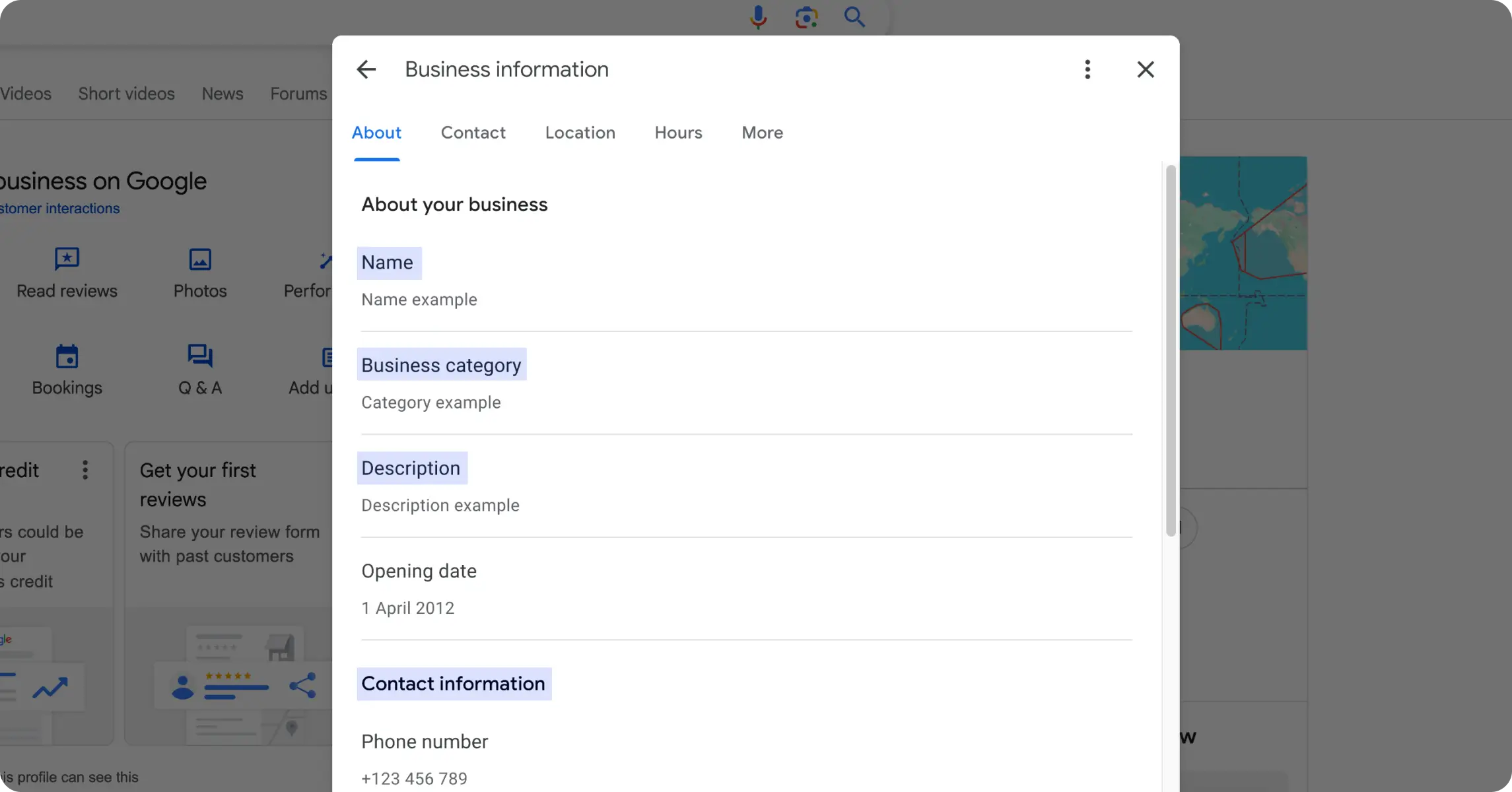
Examine the Google Business Profile thoroughly:
- Business name: needs to reflect the official company name, e.g., Silverfish Dental Clinic rather than Best Dental Clinic in Denver
- Primary category: the most specific category that exactly describes the business, e.g., “Indian takeaway” or “Pizza delivery” instead of a generic “Restaurant”
- Secondary categories: check if up to 9 relevant secondary categories that accurately reflect the business are added
- Address: Is the address format consistent with USPS standards? For service-area businesses, is it defined correctly?
- Phone number: Is this the primary business phone answered during business hours?
- Website URL: Does this link to your client’s homepage for single-location businesses or specific location pages for multi-location businesses?
- Business description: Does it naturally include relevant keywords while clearly describing services and unique selling points under 750 characters?
- Products and services: Is there a full list with product and service descriptions with pricing?
- Attributes: Have they selected all relevant attributes, like amenities and accessibility options?
Next, audit the Google Business Profile content:
- Cover photo: Is it high-quality, professionally taken, and truly representative of the business?
- Company logo: Is it a properly formatted, high-resolution logo?
- Additional photos: Are they high-quality images showing products, services, team members, and facilities?
- Videos: Are there any brief videos highlighting the services or customer testimonials?
- Posts: Is your client regularly publishing updates, offers, and events to keep their profile fresh?
Finally, check how the business engages with customers:
- Messages: Is messaging enabled and monitored?
- Booking features: If applicable, have they set up appointment scheduling or table booking?
How a Google Business Profile audit turns into tasks
Every “No” above is a task: fix the category, rewrite the description under 750 characters, upload the missing photos. Cross-check the primary category and photo count against the top competitors. Anything they have that your client doesn’t becomes a task too.
Expect the GBP to surface the longest list of quick wins of any step. Most of what you fix in the first few weeks comes from here.
How to do a Google Business Profile audit at scale
After a few audits, you’ll see the same misses repeat across profiles: wrong primary category, no posts, a thin description. With 15 or 30 clients, sweep those common gaps across every profile first, then go deep on individual ones.
How do you audit multiple client profiles from one dashboard
To audit multiple client GBPs from a dashboard, you need a local SEO tool consolidating multi-GBP data in one view and an audit feature. Localo Audit makes auditing multiple GBPs from one dashboard easy with automated weekly audits that update a score on a list of profiles to sort by. The Audit uses the same metrics each time and ends with a list of recommendations for each profile, ordered by impact.
What tools to use for a Google Business Profile audit
Instead of general SEO tools, go for a tool specifically built for managing visibility in search for local businesses. Such tools can turn these checks into a prioritized task list rather than a raw data dump to draw insights from, and do so across every profile at once. Localo’s Audit is built for exactly that. More on where it fits below.
💡 Tip: Do Google Business Profile audits on a regular basis, as they point out the optimization areas you and your team should work on. Alternatively, you can use your GBP audit report to tell your clients what they need to fix as part of a maintenance service.
3. Which terms do local customers actually search?
The ones their customers really type, both broad heads like “dentist” and longer, local-intent queries like “emergency dentist in downtown Chicago.” Local keyword research is how you find them, across both high-volume and specific long-tail phrases.
Focus your research on these 3 key areas:
- Service-based keywords, e.g., “emergency plumber”
- Location-based modifiers, e.g., “plumber in Austin”
- Neighborhood or district-specific terms, e.g., “Downtown Austin plumber”
Once you’ve got the list of all relevant terms, check the client’s GBP and website to see if they need to include any additional keywords.
Thorough local keyword research isn’t just a next task on the list. It’s the audit’s input because the entire going-forward strategy depends on the keywords you and your client decide on and the nearby competitors who appear for the same searches to benchmark against.
Create a keyword list during client onboarding, keep it up to date, and stick to it, so it describes the client’s business to a T.
How a local keyword audit turns into tasks
Add the missing terms to the GBP description and services, and hand the client (or your writer) a priority list of keywords to target on the site.
How to do a local keyword audit at scale
Keyword research doesn’t copy-paste between clients. A plumber in Austin and one in Dallas share a template but not a list. Build the process once, then redo the location and neighborhood terms for each market.
What tools to use for a local keyword audit
The criterion here is local intent: does the source surface the terms people actually use to find a local business, not just national search volume? The best free source is Google itself. Open the Performance report inside Google Business Profile Manager and the searches breakdown lists the exact terms that showed the client’s profile in results, straight from the people who searched. From there, Localo lets you check phrase popularity and track the terms you choose across the client’s profile, so you see movement over time instead of a one-time list.
💡 Tip: Perform local keyword research regularly as user search behavior, trends, and data evolve. For example, Ahrefs updates its keyword volume and cost-per-click data at least once a month, so staying informed is in your and your client’s best interest. This gives you grounds to advise on shifting their focus in a roadmap and adding new keywords to their priority list.
4. Does the website signal local relevance?
It does when each page makes the place the business serves obvious to both users and search engines. On-page SEO is a core part of a local SEO audit, and location-specific landing pages carry the strongest relevance signals.
- URL structure: Are location pages using optimized URLs? Multi-location companies should maintain a location-based URL structure like this: example.com/ services /new-york/ manhattan , or: example.com/ locations/ new-york/ manhattan
- Title tags and meta descriptions: Do they have primary service and location keywords?
- Headings (H1, H2, H3): Do they support local relevance?
- Content quality: Does it address local customer needs and demonstrate your client’s local expertise?
- Internal linking: Is there a logical structure connecting the pages?
- User experience: Is the website user-friendly and encouraging action through strong call-to-action (CTA) buttons, compelling descriptions, and interactive content?
How an on-page local SEO audit turns into tasks
Rewrite the weak title tags and H1s with service-plus-location terms, fill out thin or missing location pages, and fix the internal links that don’t connect related pages.
How to do an on-page local SEO audit at scale
Across a portfolio, schedule these crawls so no client’s site goes a full quarter without one, and triage by the pages that drive the most local traffic rather than fixing every site end to end.
What tools to use for an on-page local SEO audit
On-page is where checking page-by-page falls apart. A crawler like Screaming Frog pulls every title tag, H1, and broken internal link across all the client’s location pages in one pass, so you’re auditing the whole site, not spot-checking a few URLs. The local-relevance call (does this page actually speak to local intent?) still needs your eyes.
5. Can Google and AI bots reach your client’s site at all?
Only if the pages are crawlable and indexed, and nothing else in this step matters until they are. That bar now applies to AI search bots, not just Google’s crawlers: they fetch pages to decide which local businesses to surface and recommend, and none of them can rank, cite, or recommend a page they can’t see. When a page isn’t crawlable, no amount of optimization helps. It drops out of the local results, and for that search the business is invisible. Speed, schema, and security only pay off once the pages are reachable in the first place.
Your technical local SEO audit should include, in order of what breaks visibility first:
- Crawlability and indexation: Are the location and service pages that win local rankings crawlable and actually indexed? Check Search Console coverage or run a site: search. A page Google and AI bots can’t reach can’t surface in the local pack or be recommended, so this comes first.
- HTTPS security: Is the entire site secure to keep visitors’ data safe?
- Status errors: Are there broken links or 404 errors sending visitors, and crawlers, to missing pages?
- Schema markup: Is local business schema in place so Google and AI systems can read the business details cleanly?
- Mobile responsiveness: Most near-me and local searches happen on a phone, often with intent to call or visit, so check the site holds up on smartphones: clickable buttons, right-sized images, and an accessible design.
- Page speed: Do pages load in under 5 seconds on web and mobile? Slow loads cost you on both ends: a nearby customer abandons before the page renders, and every extra second makes the page more expensive for Google and AI bots to crawl, so they fetch fewer of your pages.
How a technical local SEO audit turns into tasks
Get the location and service pages crawlable and resubmitted for indexing first, clear the broken links and 404s, add the missing LocalBusiness schema, then fix the mobile issues and compress the slow pages.
How to do a technical local SEO audit at scale
With many local clients, batch the crawls and triage by severity instead of fixing site by site as you go. An indexation failure that pulls one client out of the local results outranks a cosmetic fix on another, so triage by what is actually keeping pages from ranking locally.
What tools to use for a technical local SEO audit
This is a job for automated diagnostics, not manual review. Start with Google Search Console: its index coverage shows exactly which pages are indexed and which Google skipped, and why. Screaming Frog crawls the site the way a bot does, flagging blocked pages, broken links, redirect chains, and missing LocalBusiness schema. PageSpeed Insights scores load speed and mobile experience, where most local searches happen. Run them, then pass the flagged issues to the client’s developer as tasks.
6. Which local links is the client missing?
Usually the local ones competitors already have: chamber and association links, sponsorships, local news mentions, and industry directories. Local relevance in the backlink profile dramatically affects the ability to rank in the service area, and a few high-quality local links often outperform dozens of generic ones from unrelated sites.
Focus your link analysis on:
- Local business associations and chambers of commerce
- Community sponsorships and events
- Local news outlets and publications
- Industry-specific local directories
- Neighboring businesses (non-competing)
- Use your client’s competition backlink profiles in the audit, too. They can help you uncover potential opportunities your client might’ve overlooked.
How a backlink audit turns into tasks
Pitch the local associations and chambers worth a link, reclaim the unlinked brand mentions, and chase the local links a competitor already has that your client doesn’t.
How to do a backlink audit at scale
Link building never really automates, so across a portfolio, templatize the outreach and start with the highest-authority local opportunities each client can realistically earn.
What tools to use for a backlink audit
Backlinks are a website signal, not a GBP one, so this is the step that lives outside the local-SEO toolset. The criterion is whether a tool shows you the “gap” (which local links competitors have earned that your client hasn’t) rather than a raw link count. Ahrefs or Moz map the full backlink profile and let you compare it against competitors’, so you can see exactly which local links are worth chasing.
💡 Tip: Check if the backlinks send relevant signals about your client’s local authority and expertise. That counts for brand mentions without linking back to your client’s website, too. Unlinked brand mentions can help with brand awareness and may contribute to Google’s understanding of a business.
7. Are the client’s citations consistent everywhere?
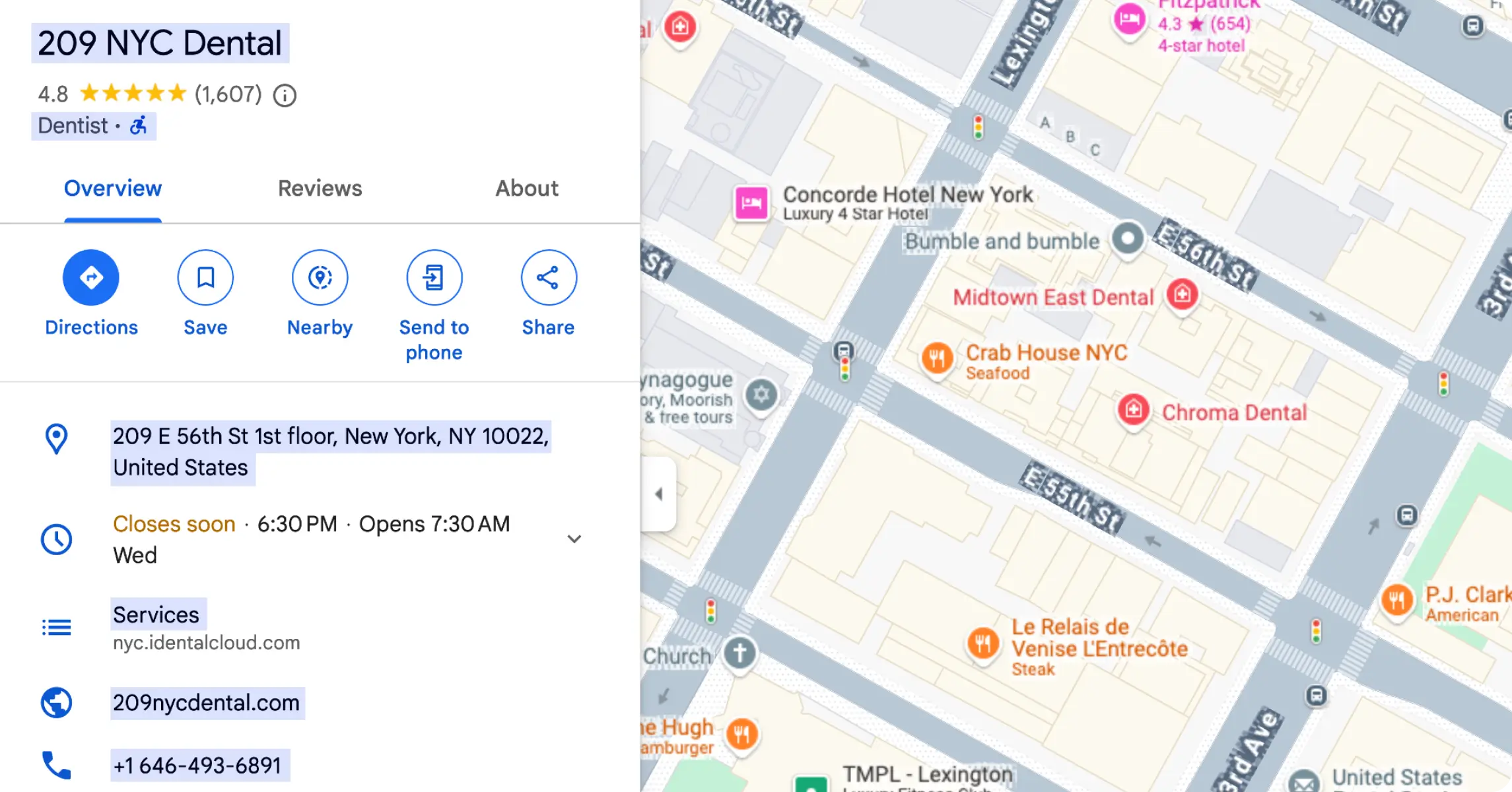
This check confirms whether the business name, address, phone number, and website (NAP+W) match across every platform that lists the business. Run the citation analysis starting with the primary data aggregators that feed other sites, then the major industry-specific directories.
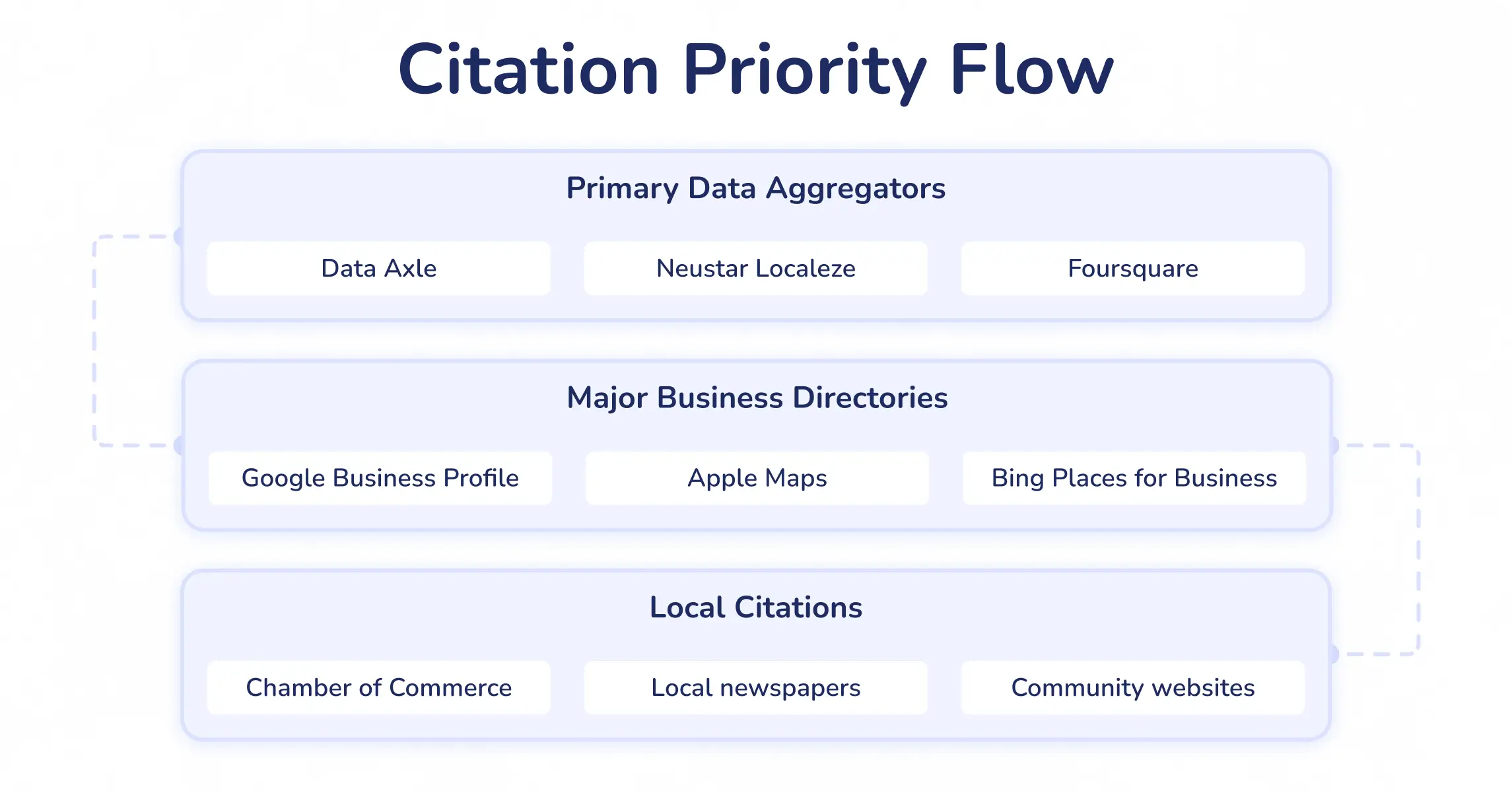
Pay special attention to:
- Primary data aggregators, e.g., Data Axle, Neustar Localeze, Foursquare
- Major review platforms, e.g., Google, Yelp, TripAdvisor
- Industry-specific directories
- Social media profiles, e.g., Facebook, LinkedIn
- Local business directories, e.g., Greater New York Chamber of Commerce Business Directory
How a local citations audit turns into tasks
Correct the NAP mismatches on the primary aggregators first, claim or complete the missing listings, and standardize the details that differ from one directory to the next.
How to do a local citations audit at scale
The build list multiplies fast: 30 profiles means 30 sets of directories to track. Keep a record of which listings each profile is already on so you’re not re-checking the same ones every month.
What tools to use for a local citations audit
Spotting NAP inconsistencies is still manual work. You check the client’s name, address, and phone against each listing yourself. Where a tool helps is the build side: Localo’s citation tracking recommends the directories that matter most locally and shows which citations competitors are listed in that your client is missing, so you leave with a list of listings to create, not just problems to fix.
💡 Tip: Google has become smarter at handling minor variations, so small differences like “Street” vs. “St.” don’t always hurt rankings directly. However, major discrepancies (e.g., different phone numbers or addresses across multiple directories) can lead to trust issues and reduced authority in local searches. Companies gain several ranking positions simply by cleaning up citation inconsistencies across major platforms.
8. How healthy is the review profile?
Judge it on the overall rating, how often new reviews come in, how the client responds, and the themes the feedback keeps repeating. Reviews work as both ranking signals for Google and trust signals for potential customers, so the audit examines quantity, quality, recency, and response patterns.
Pay attention to:
- Overall rating: How does your client’s average rating compare to competitors?
- Review velocity: Are they consistently getting new reviews?
- Review response: Do they respond promptly and professionally to all reviews?
- Sentiment patterns: Are there recurring themes in positive and negative feedback?
- Platform distribution: Are they collecting reviews across multiple relevant platforms?
A weak review profile can undermine even the best optimization efforts, while effectively managing expectations and addressing negative feedback are key to maintaining a good reputation.
How Google review analysis turns into tasks
Reply to the reviews still waiting on a response, set up a steady review-request routine so new ones keep coming, and flag the recurring complaints the client needs to fix offline.
How to do Google review analysis at scale
Reviews are the step that breaks down fastest across a portfolio: checking them profile by profile means logging into each account. Watch every client’s reviews from one dashboard so the weekly pass stays realistic at 15 or 30 profiles.
What tools to use for Google review analysis
The criterion is whether a tool surfaces patterns across platforms, not just lists reviews. Localo’s review monitoring pulls reviews together, surfaces recurring sentiment themes, and helps you respond, so review analysis becomes a steady routine rather than a periodic scramble.
9. Which fixes should you tackle first?
The high-impact, low-effort ones, scored ahead of everything else. By now each step has produced its own tasks, so you’re looking at a long list of potential improvements for your client. Prioritization is what turns that list into the short, ordered set they actually work through this week, and it’s the key to getting buy-in and seeing the changes implemented.
How do you prioritize the fixes after an audit?
Prioritize the fixes by scoring each audit finding on two axes: its impact on local rankings and how hard it is to implement. Think not only of the complexity of the task but how big the team is, how much time you have, what the client’s budget is, and what the dependencies are. The high-impact, low-effort fixes go first. That’s the buy-in you show the client in week one.
Prioritization changes shape once you’re running more than one profile. Auditing a single business asks “what should I fix here?” Auditing a portfolio of 15 or 30 asks “which issues matter most across all of them?” A category error or missing service that shows up on 15 profiles outranks a one-off photo fix on a single one, so prioritize by the pattern, not just the profile. That’s how you decide where you and the team spend your hours when every client has a list.
These issues typically deserve top priority:
- Critical GBP issues, e.g., incorrect categories or missing information
- Major citation inconsistencies across primary platforms
- Negative review patterns requiring immediate attention
- Technical issues affecting page visibility to bots
- Missing or incorrect schema markup
💡 Tip: What if two findings score the same in the prioritization? Follow these rules:
- Keywords before anything else: A careful keyword strategy is the foundation of the GBP audit. It delivers local leaders data to benchmark against and sharpens understanding of the intent behind searches, allowing for better-suited content.
- Citations before sensitive profile edits: Change the business name, address, and phone number in local directories first before making these changes on the profile. Citation inconsistencies can harm the profile, and Google may not trigger a GBP reverification if it sees several confirmed NAP listings elsewhere.
- High-impact reds before medium-impact oranges: Competitors’ profiles serve as benchmarks for further GBP optimization, and you shouldn’t jump to conclusions before checking them. For example, don’t say: “30 profile photos are too few” until you confirm that the top-3 GBPs have 80.
10. How do you turn the audit into a client report?
You shape the findings into a short, client-ready document built around impact and priority. The report is the part of the audit your client actually sees, where your work becomes visible and a client decides you’re worth keeping.
There’s no one-size-fits-all format, so it’s best to keep a few templates, e.g.:
- initial local SEO audit report template to use when you start working with a new client
- sample GBP audit report format for pitching prospective clients
- monthly and quarterly local SEO audit report templates you’ll send automatically
You also need to consider the goal of the report: are you informing your client about activities you’ll take to improve their profile’s performance or are you preparing a list of tasks that they can complete?
What reports should you expect from a local SEO audit tool if you’re presenting to a client?
The local SEO audit tools you use should generate reports with a specifically recommended fix, context, and a reason why, so your client knows where they stand. And ideally, they route you straight to the tool or feature that fixes it. The reports should detail overall GBP health, local rank tracking, citation & NAP consistency, user sentiment & ratings, and website & technical local signals.
You can also build an audit report from the checklists below and the example structure in the next section, leading with current local SEO metrics, the prioritized tasks, and a plain-language summary that ties each number to an outcome the owner cares about.
Reporting earns its keep over time. A single audit is a snapshot. A series of reports is a trend, and the trend is what proves the retainer is working. When a client can watch their rankings climb and their calls rise month over month, the conversation stops being about whether to keep paying you and turns to what to tackle next.
💡 Tip: The easiest way to generate documentation is reliable local SEO software with white-label reporting features. These tools often send automated reports directly to your clients’ inbox, so that’s a time saver for your agency.


What goes into a local SEO audit report?
A local SEO audit report’s job is not to hand over a list of fixes. As Aleyda Solis puts it in her SEO audit template, the goal is to communicate findings in a way that drives action, which means leading with impact and priority. A client who can see what matters most, why it matters, and who owns it will approve and move. A client handed 40 undifferentiated fixes will stall.
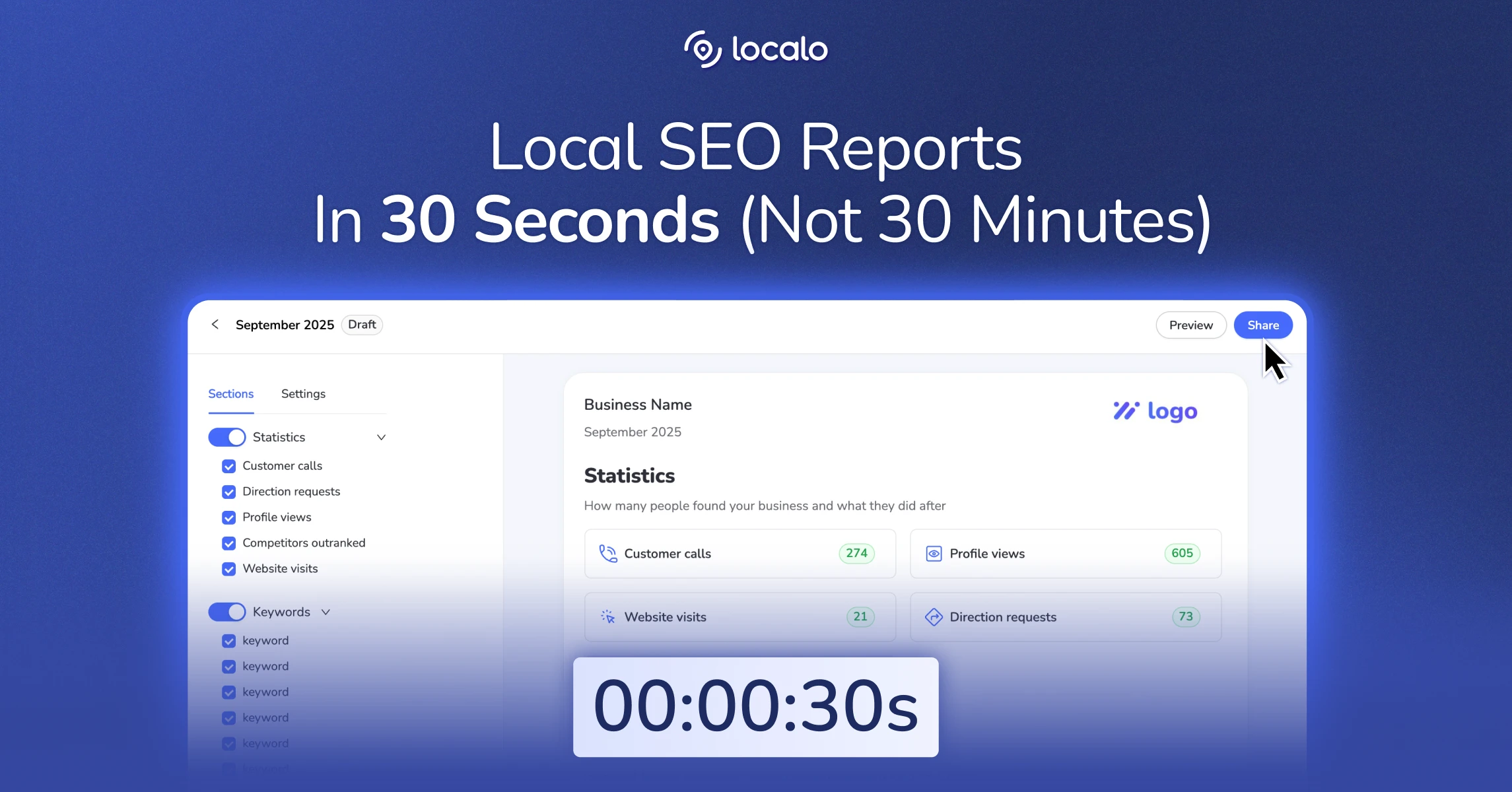
There are two ways to create local SEO audit reports: get a link from Localo Audit to share with a client, or DIY a report you fill in manually.
The local SEO audit report shared via a link from Localo Audit
Here’s what the shareable report from Localo Audit feature includes:
- A single URL your client can access in a browser without logging in or downloading anything
- No Localo logo
- Last audit date and the next scheduled audit
- Audit score ranging from 0 to 100% at the top of the page
- Colored priority filters that organize recommendations into high- and medium-impact activities or say all is good
- Sequencing instructions your client can see to focus on what brings the highest return first
- Nearby leader benchmarking showing key figures of five named competitors where it’s relevant
- Specific, plain-language recommendations under each item
The build-your-own-report route
If you prefer to create your own report that contains data from several tools, the client’s website, paid media, or when your customer requests a document in a specific format (like Excel or Sheets), here’s how to approach it. Use the structure below as the skeleton, then fill each section with the data the checklists help you collect.
What a finished local SEO audit report looks like: Example
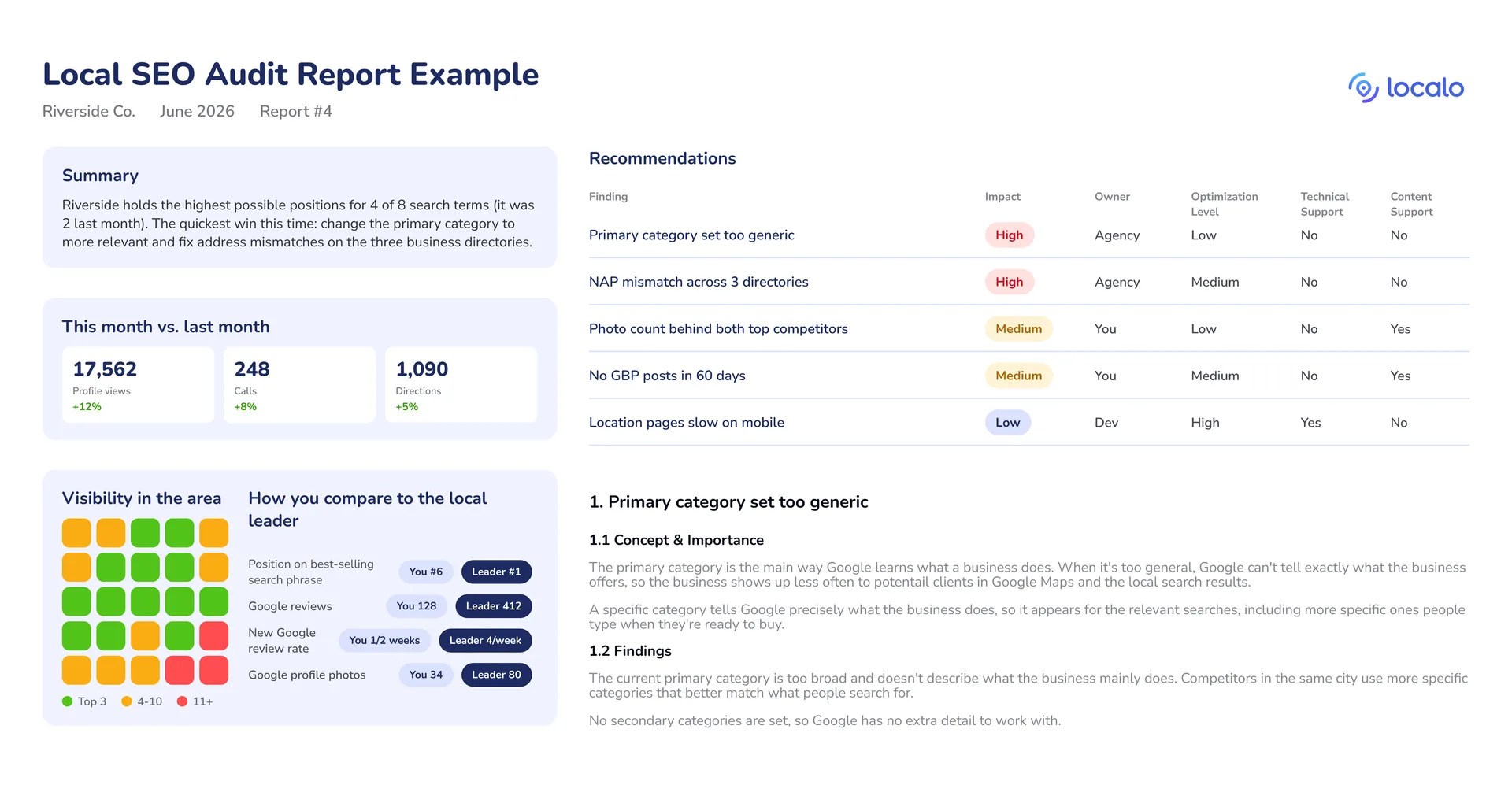
A client-ready report usually runs in this order:
- Executive summary. 2 or 3 plain-language sentences covering where the business stands, the single biggest opportunity, and the few changes that will move the needle this period. No jargon.
- Visibility snapshot. The local grid or map plus current rankings for the main keywords, and how they’ve moved since the last report.
- Metrics that matter. Profile views, calls, direction requests, and website clicks, each shown against the previous period so the trend is obvious.
- Competitor baseline. How the top 2 or 3 competitors compare on rankings, reviews, categories, and photos, so every number has context.
- Priorities, scored. This is the part that earns the report its keep. List each finding with how much it matters (high, medium, low), its current status, and the priority that falls out of the two. Following Aleyda Solis’s method, anything highly important and not yet optimized goes to the top, and each line shows who owns it (you, the client, or their developer).
- Findings and recommended actions. The detail behind the priorities, grouped by area (GBP, website, citations, reviews). For each one, give a short reason it matters and the specific action to take, written as an opportunity to improve rather than a fault to call out.
- Next steps and follow-up. The agreed actions with owners and target dates, tracked so progress is visible before the next report lands.
The checklists below feed the metrics, findings, and task sections. Copy and paste them into your own template.
Google Business Profile audit checklist
| Type of audit | Points to address | Status | Additional info |
|---|---|---|---|
| GBP audit | Google Business Profile is verified | Yes / No | |
| GBP audit | Business name matches the real-world name (no keyword stuffing) | Yes / No | |
| GBP audit | Primary category is the most specific fit | Yes / No | e.g., change “Restaurant” to “Pizza delivery” |
| GBP audit | Relevant secondary categories added (up to 9) | Yes / No | |
| GBP audit | Address / service area set correctly | Yes / No | |
| GBP audit | Primary phone number correct and answered in hours | Yes / No | |
| GBP audit | Website URL points to the right page | Yes / No | e.g., link the location page, not the homepage |
| GBP audit | Business description uses relevant keywords (under 750 characters) | Yes / No | e.g., add ‘Sunday brunch’, ‘savory pancakes’ |
| GBP audit | Products / services listed with descriptions and pricing | Yes / No | |
| GBP audit | Attributes selected (amenities, accessibility) | Yes / No | |
| GBP audit | Cover photo, logo, photos and videos uploaded | Yes / No | e.g., upload photos of the new brunch menu |
| GBP audit | Posts published weekly | Yes / No | e.g., schedule Thursday quiz night announcements |
| GBP audit | Messaging enabled and monitored | Yes / No | |
| GBP audit | Booking / appointment feature set up (if relevant) | Yes / No |
Google Business Profile audit checklist for local SEO citations & listings
| Type of audit | Points to address | Status | Additional info |
|---|---|---|---|
| Citations & listings | NAP accuracy verified | Yes / No | |
| Citations & listings | Bing Places for Business profile set up | Yes / No | e.g., need to complete profile setup |
| Citations & listings | Apple Business profile set up | Yes / No | |
| Citations & listings | Added to data aggregators (e.g., Foursquare, Neustar Localeze, Data Axle) | Yes / No |
Google Business Profile audit checklist for local SEO ratings & reviews
| Type of audit | Category | Value | Additional info |
|---|---|---|---|
| Ratings & reviews | Star rating | e.g., 4.6 | e.g., 2% increase |
| Ratings & reviews | Review velocity (weekly / monthly / quarterly) | e.g., 15 reviews/week | e.g., grew after uploading the new menu |
| Ratings & reviews | Owner responses | Yes / No | e.g., need to respond to last month’s reviews |
Google Business Profile audit checklist for stats & metrics
| Type of audit | Category | Value | Additional info |
|---|---|---|---|
| Stats & metrics | SERP position | ||
| Stats & metrics | Maps position | ||
| Stats & metrics | Profile visits | e.g., increased from Q1 by 17% | |
| Stats & metrics | Clicks on call / directions / website | e.g., call requests dropped after adding the direct booking button |
How often should you run a local SEO audit?
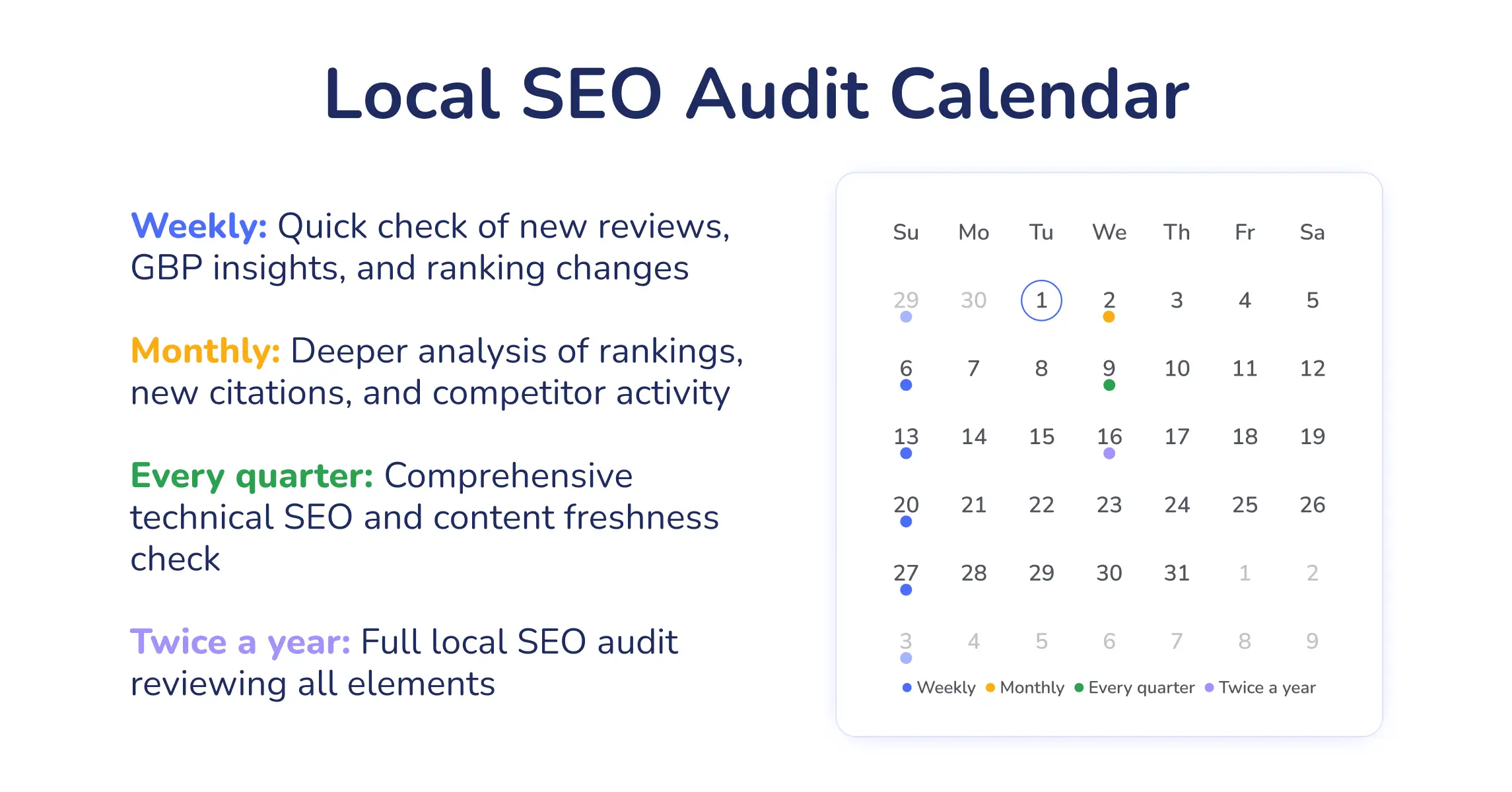
On a recurring cadence: a quick check weekly, a deeper review monthly, a technical pass quarterly, and a full audit twice a year. The biggest mistake I see is treating an audit as a one-time project. Local search keeps shifting through algorithm updates, competitor activity, and changing search behavior, so regular monitoring lets you respond quickly while protecting what you’ve already achieved.
Localo software can help you simplify this process. Localo’s Audit runs weekly, and the Audit score updates automatically, with history. When you follow the report’s recommendations to improve the client’s profile, you’ll see the progress of your actions after the next re-check.
Setting up an audit schedule
The local SEO audit schedule I recommend:
- Weekly: Quick check of new reviews, GBP insights, and ranking changes
- Monthly: Deeper analysis of rankings, new citations, and competitor activity
- Every quarter: A thorough technical SEO and content freshness check
- Twice a year: Full local SEO audit reviewing all elements
What’s a monthly local SEO audit workflow and how do you know the issues actually got fixed?
A good monthly audit workflow is basically a loop:
- weekly audit to check the score and see areas for improvement
- prioritization of tasks for the upcoming week
- completing priority optimization tasks
- re-checking with another weekly audit
If the issues are fixed, the GBP visibility and performance in local search will likely improve over time. If you use Localo, you’ll see the effects as the Audit score progresses.
Which local SEO audit tools do you actually need?
You can run a full local SEO audit without paid software. But auditing by hand gets slow fast, and once you’re past 3 or 4 clients, logging into each account every week stops being realistic.
What separates a local SEO audit tool from a generic site auditor comes down to 3 questions: does it hand you a prioritized list of tasks instead of a wall of raw data, does it work across every profile at once, and does it save real time versus doing it by hand? A general SEO crawler tells you what’s technically broken on a website. A local SEO tool tells you what to fix on the Google Business Profile, the citations, and the reviews that actually decide local rankings.
Localo: local SEO automation platform for specialists
Localo is the tool the per-step notes above keep pointing to because it’s built around the audit rather than bolted onto a generic one.
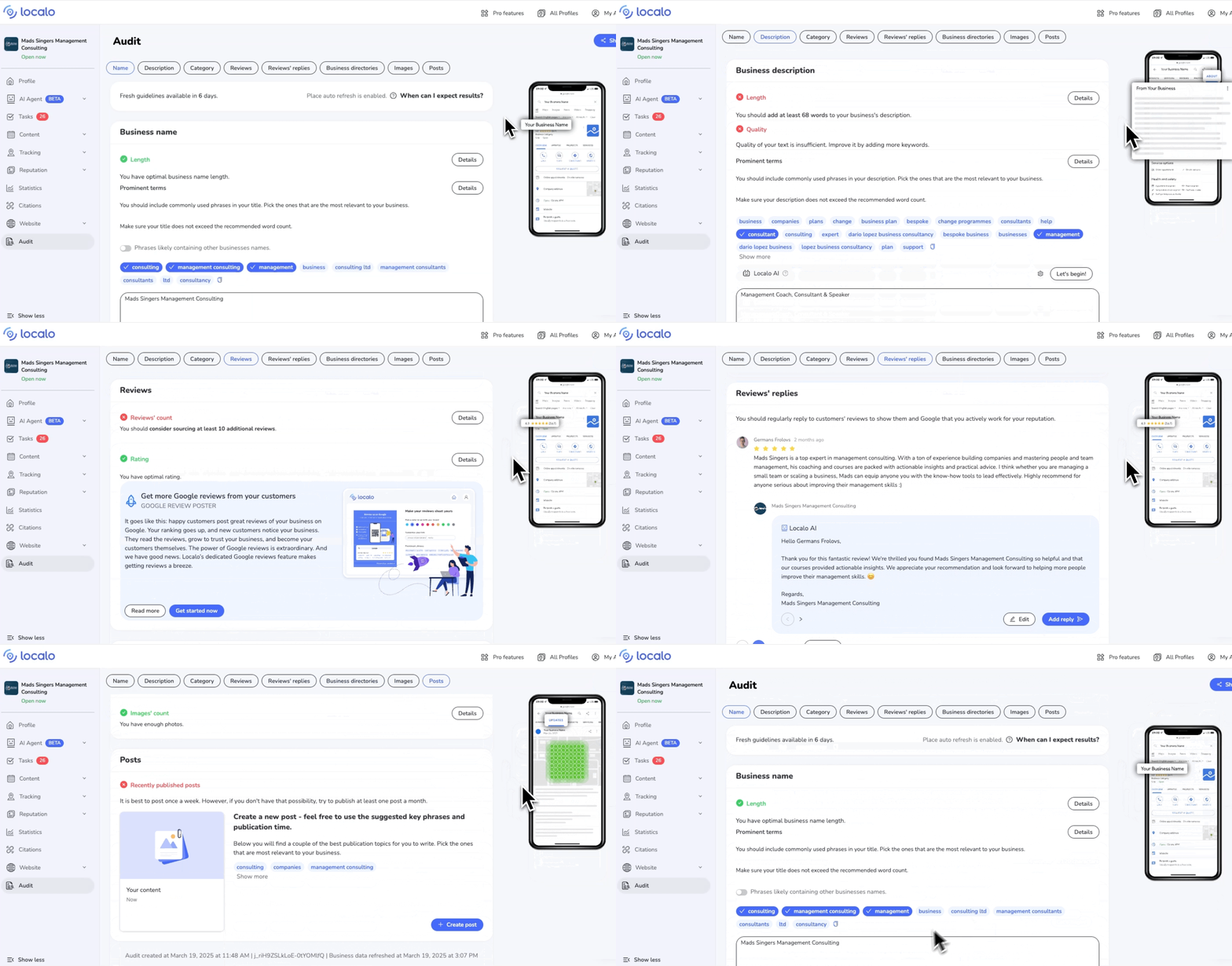
Localo Audit runs several analyses for each Google Business Profile you manage, combines them into a single Audit score with history, and returns an ordered list of what to fix, why it matters, and which tool resolves it. All benchmarked against five nearby competitors. Scores appear on your profile list, so the whole portfolio ranks worst first. You send it as a link the moment it’s ready.
It’s the diagnostic layer of Localo’s local marketing autopilot:
- GBP audit with optimization recommendations in priority order
- Local rank tracking and a visibility grid across multiple locations
- Citation tracking that recommends the most locally relevant directories and flags the citations competitors have that your client doesn’t
- Review monitoring that surfaces ratings, velocity, and sentiment patterns
- Competitor analysis that shows where each client stands against the local leaders
Localo covers the GBP and local side. For the website data it doesn’t track, pair it with the free essentials: Google Analytics for how visitors behave once they land on the site, and Google Search Console for the organic queries and pages driving impressions and clicks.
For the wider roundups, compare the best local SEO tools for agencies and freelancers.
Why run local SEO audits at all?
How does an audit win and keep clients?
A standalone local SEO audit is one of the easiest things to sell: it’s concrete, scoped, and gives a prospect something tangible before they commit. Show a local business owner what’s broken on their profile and you’ve started the relationship. Plenty of specialists lead with that audit, then turn the findings into a recurring engagement, which makes the work easy to price: the audit defines the scope, the report shows the value, and the prioritized tasks become the monthly deliverable. See how to get more local SEO clients and turn leads into clients.
What results does an audit drive?
Closing the gaps an audit surfaces shows up where it counts: rankings in the local 3-pack, then the calls, directions, and foot traffic that follow. I’ve seen businesses transform their local visibility within weeks after fixing findings they’d overlooked for months.
Conclusion
The version of this that works is the loop, not the one-time audit. Audit, prioritize, work the tasks, show the client the report, then run it again next week a little faster. The first pass is the heavy one. After that you’re maintaining the profile and catching problems before they cost rankings.
Starting today? Pick your worst-performing client and run the Audit. It returns an ordered list rather than a full dump: every finding carries a priority by impact, the reason it matters, and a route into the Localo tool that resolves it.
When doing that by hand across a roster of clients stops scaling, that’s where a tool earns its place. Localo runs the audit on every profile you manage and re-checks each one weekly, so you’re reading results instead of running checks.
FAQ about local SEO audits
How do you build an audit report with competitive benchmarks?
Identify your client’s top 3–5 competitors and present the findings of your local SEO audit side-by-side with their metrics: rankings, reviews, categories, and number of photos. This approach helps to spot opportunities for quick wins and prioritize concrete GBP optimization actions.
How often do you perform a local SEO audit?
You should run a full local SEO audit twice a year alongside smaller weekly and monthly checks.
- Weekly check-ins include monitoring GBP performance, review management, and checking for sudden ranking changes.
- Monthly checks include NAP consistency verification, business hours & holiday updates on GBPs, and tracking Maps rankings of clients & top competitors.
- Each quarter, check local citations and monitor technical local SEO: local website content & schema as well as site speed and responsiveness.
- Every 6 months, complete a comprehensive GBP audit plus client’s local website check for technical SEO and backlink profile
What does a comprehensive local SEO audit include?
An in-depth local SEO audit combines a review of a client’s Google Business Profile together with reputation check, website local signals, local citations, and backlink profile against top-ranking competitors. Audit findings are summarized in a report that includes:
- GBP health overview: profile visibility, NAP consistency, primary & secondary categories, listing accuracy, profile rating, customer reviews, profile photos, and posts
- Website signals: LocalBusiness schema, location pages, meta data, technical SEO, backlink profile
- Local citations: Accuracy in major and industry-specific directories
Which metrics should you prioritize?
Prioritize Google Business Profile completeness, NAP consistency, and reviews. A complete GBP has accurate business name, primary & secondary categories, business hours, verified address, and a business description. NAP (Name-Address-Phone) information must be accurate across the GBP, customer website, and local directories. Review metrics include both the overall rating and review frequency.
How can you standardize the audit process across clients?
Create a master checklist for local SEO auditing and a unified report template you’ll use for every client. You can copy-paste the checklists above in Excel or Sheets, or use an auditing tool like Localo to run audits and generate reports automatically.
Can the Audit score be trusted?
Eight of the seventeen factors Localo tested in our local SEO ranking factors study track with position, and that helped set what your Audit score weighs most. Localo’s Audit score is a reliable signal telling you how a client’s GBP measures against top competitors. The Audit analyses key GBP metrics, competitor benchmarks, and search trends to suggest optimization actions organized by their impact.