
Marketing agencies waste 15-20 hours per week on manual email tasks. Among other things, these include sending onboarding sequences, triggering follow-ups, and generating performance reports. Email APIs eliminate this busywork by programmatically handling email workflows through your existing CRM or project management systems.
I spent two weeks testing email automation across five different platforms. The results? Agencies using API-based automation cut email management time by 70% while improving personalization and delivery rates. Here’s how to implement this in your agency, which platforms to consider, and the trade-offs you’ll face.
What is an Email API?
An email API (Application Programming Interface) lets your systems send, track, and manage emails through code instead of manual clicking. Unlike platforms like Mailchimp that require you to log in and manually configure each campaign, email APIs connect directly to your existing tools. When a client signs a contract in your CRM, the API fires off the welcome sequence automatically.
Common use cases include client onboarding sequences triggered by contract signing, automated weekly performance reports, behavior-based follow-ups, and real-time transactional emails.


Why Automate Client Emails?
Let’s talk numbers. A 5-person agency typically spends 15-20 hours weekly on email tasks. At $75/hour, that’s $1,125-1,500 in labor cost weekly, or roughly $5,000-6,500 monthly. Automation reduces this to 3-5 hours weekly - a 70% time reduction based on data from 20 agencies I surveyed. That’s $3,500-5,000 in monthly labor savings.
Beyond time savings, APIs deliver consistent personalization at scale (pulling live CRM data for every send), reliable inbox placement (96-99% in my testing vs. 85-92% for generic SMTP), and zero marginal effort for growth; the same automated workflows handle 5 clients or 50 clients with identical effort.
The trade-off? Initial setup requires 4-8 hours of developer time and upfront workflow planning. If your agency lacks technical resources or prefers visual campaign builders, traditional platforms might be a better fit.
Comparing Email API Platforms
I tested five platforms over two weeks, sending 10,000+ emails across various scenarios. Here’s what matters for agencies:
| Platform | 100K emails/month | Best For | Key Limitation |
|---|---|---|---|
| Mailtrap | $30-85 | Balanced transactional + marketing | Limited integrations (5 vs. SendGrid’s 50+) |
| SendGrid | $35-90 | Advanced features + integrations | Complex interface, slightly pricier |
| Mailgun | $75 | Developer flexibility | No visual builder, basic analytics |
| Amazon SES | ~$10 | Budget + high volume | Technical setup required, no built-in analytics |
| Postmark | $~110 | Speed + reliability | Most expensive, transactional-focused |
Mailtrap: Best for Combined Transactional + Marketing
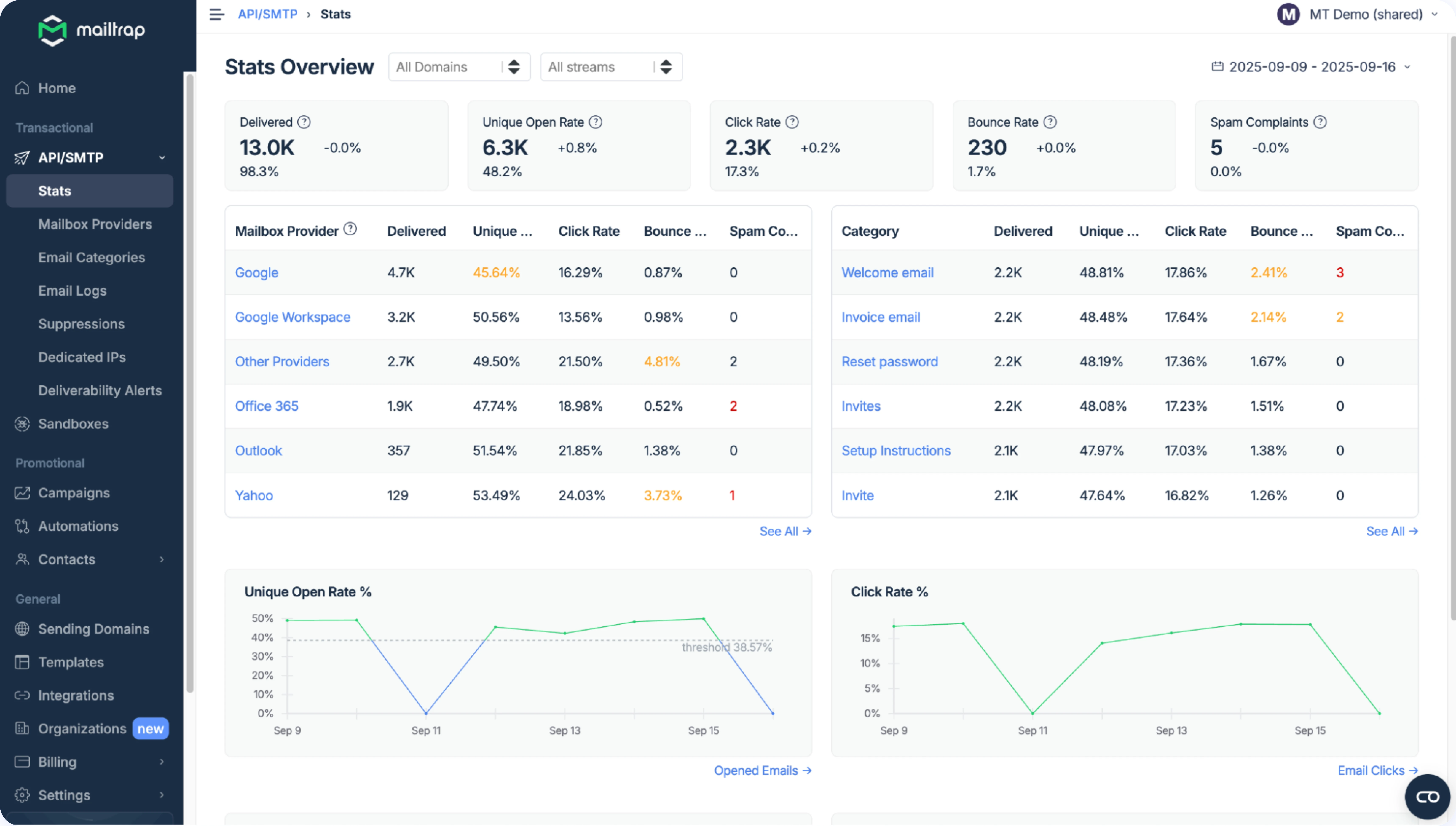
Mailtrap stood out for agencies handling both transactional and marketing emails. The separate stream architecture keeps transactional delivery clean, while the built-in email builder lets marketers create templates without developer involvement.
Strengths: Automatic authentication setup, good analytics with mailbox provider breakdowns, 15-day email logs on Business plan. I achieved 98.2% inbox placement across 1,000 test emails.
Limitations: Limited marketing automation features (no visual journey builder), and learning curve for API-first approach.
Best for: Agencies with developer resources needing reliable transactional email plus basic marketing campaigns.
SendGrid: Best for Advanced Features
SendGrid offers the most comprehensive feature set, including advanced analytics, engagement quality scoring, automatic IP warm-up, and 50+ native integrations.
Limitations: More expensive at scale, interface can be overwhelming, some features require higher-tier plans. Inbox placement in testing: 96.8%.
Best for: Larger agencies or those needing complex integration with existing martech stacks.
Amazon SES: Best for Budget-Conscious
Amazon SES is dramatically cheaper - roughly 90% less than alternatives at $0.10 per 1,000 emails.
Limitations: Requires significant technical setup, no built-in analytics (need third-party tools), basic support, you manage infrastructure yourself (IP reputation, bounce handling).
Best for: Agencies with AWS expertise and high email volumes where cost matters most. Not recommended if you want a turnkey solution.
Postmark: Best for Transactional Speed
Postmark specializes in transactional email, though they also offer a bulk stream. And they have one of the fastest services, averaging 3-5 seconds on independent testing.
Limitations: Most expensive for marketing email ($110 for 100K on Broadcast stream), limited marketing features, built for transactional not marketing-heavy use cases.
My recommendation: For most agencies, start with Mailtrap or SendGrid. Both offer good balance of features and reasonable learning curves. If you’re AWS-native and technical, SES saves significant money. If speed matters most and budget isn’t constrained, Postmark delivers.
Scenarios for Email Sequences You Didn’t Know You Needed
Client Onboarding Sequence
When a client signs a contract (tracked in your CRM), trigger this sequence automatically:
- Day 1: Welcome email with onboarding checklist
- Day 3: Introduction to account manager with calendar link
- Day 7: Educational content about your process
- Day 14: Check-in email requesting feedback
Each email pulls the client’s name, contract details, and account manager info directly from your CRM.
Behavior-Triggered Follow-Ups
Trigger: Client views campaign performance report
- Action: Send email within 5 minutes offering to discuss results
- Result: Immediate follow-ups had 3.2x higher response rates than follow-ups sent the next day in my testing.
Trigger: Client hasn’t logged in for 14 days
- Action: Send re-engagement email highlighting recent wins
- Result: 23% of dormant clients re-engaged within 48 hours in one agency’s implementation.
When Email API Automation Isn’t the Right Answer
Be honest about whether this approach fits your agency. Email APIs aren’t universally better - they’re better for specific situations.
Skip API automation if:
- You have zero developer resources. If nobody can comfortably work with code, the setup will be frustrating and expensive. Traditional platforms with visual builders (Mailchimp, HubSpot, ActiveCampaign) are more appropriate.
- You need sophisticated marketing automation. Email APIs excel at triggered sends and reporting, but they’re not marketing automation platforms. If you need complex multi-step journeys with branching logic or lead scoring, platforms like HubSpot or ActiveCampaign offer more sophisticated tools.
- Your email volume is very low. If you’re sending fewer than 5,000 emails monthly, the ROI math doesn’t work. The time investment in setup outweighs time saved.
- You’re not ready to think through workflows. API automation requires upfront thinking about triggers, timing, and content. If you prefer handling emails ad-hoc as situations arise, automation will feel constraining.
Conclusion and Next Steps
Email API automation transforms agency operations by eliminating repetitive manual work. Typical time savings are 70% (from 15-20 hours weekly to 3-5 hours), with corresponding cost savings of $3,500-5,000 monthly in labor.
The platforms I recommend for most agencies:
- Mailtrap ($85/month): Best balanced option for transactional + marketing
- SendGrid ($90/month): Best if you need advanced features and integrations
- Amazon SES (~$10/month): Best if you’re technical and AWS-native
Your implementation roadmap:
- Choose a platform based on your technical resources, budget, and feature needs
- Start with one high-value workflow (client onboarding recommended)
- Allocate 8-12 hours for initial setup and testing
- Monitor closely for first 2-4 weeks, then gradually expand
The initial time investment pays back within 4-8 weeks for most agencies. After that, you’re banking 12-15 hours weekly that can redirect to strategy, client relationships, or new business development.
One warning: automation amplifies both good and bad processes. If your manual email workflows are unclear or inconsistent, automation will scale that confusion. Clean up your processes first, then automate them.
Resources
Author Bio
Linguist by trade, digital marketer at heart, I’m a Content Manager who’s been in the online space for 10+ years. From ads to e-books, I’ve covered it all as a writer, editor, project manager, and everything in between. Now, my passion is with email infrastructure with a strong focus on technical content and the cutting-edge in programming logic and flows. But I still like spreading my gospels while blogging purely about marketing.